 Databiomes
Getting Started
Note: Currently only available for Windows!
Text to speech using Kokoro is included in the Flora Engine Plus plugin. It allows for the conversion of text in several languages into a generated audio file.
The voices used for generated audio can be downloaded from here and must be placed within the /Content/espeak-ng/ folder.
A description of the voices including language and quality can be found here.
Japanese and Mandarin Chinese are not currently supported.
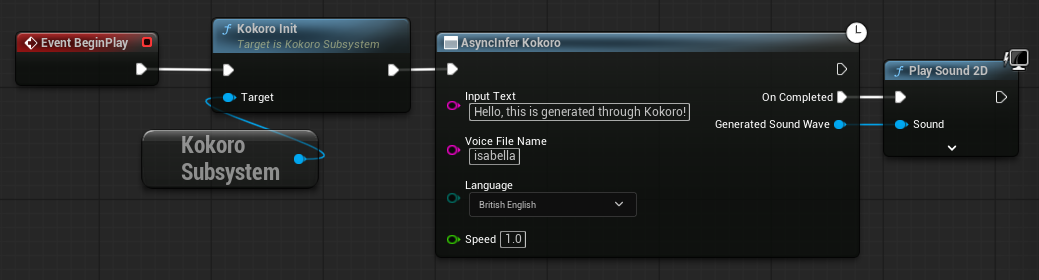
Similarly to Whisper, Kokoro is implemented as a subsystem which must also be initialized before use.
After downloading the desired voice and placing it in the correct folder, in a blueprint, initialize Kokoro by getting the subsystem and calling Kokoro Init. Then AsyncInfer Kokoro can be called with Input Text to convert to speech, the Voice File Name of the desired voice (with .bin or without), the Language of the voice and the Speed of speech. On completed the Generated Sound Wave can be played using Play Sound 2D.