 Databiomes
Realtime Audio
The Flora Engine Plus plugin also provides a realtime audio capture system. For the simplest setup follow these steps:
- In a blueprint, use the
Get WhisperSubsystemnode and drag off of it to use theInitialize Whispernode. - From the
Whisper Subsystem, use theBind Event to On Realtime Whisper Processedand create a custom event for it. - After binding the event, use the node
Whisper Realtime Captureand setRealtime Whisperto true. - From the bound event, process the transcribed audio data as required.
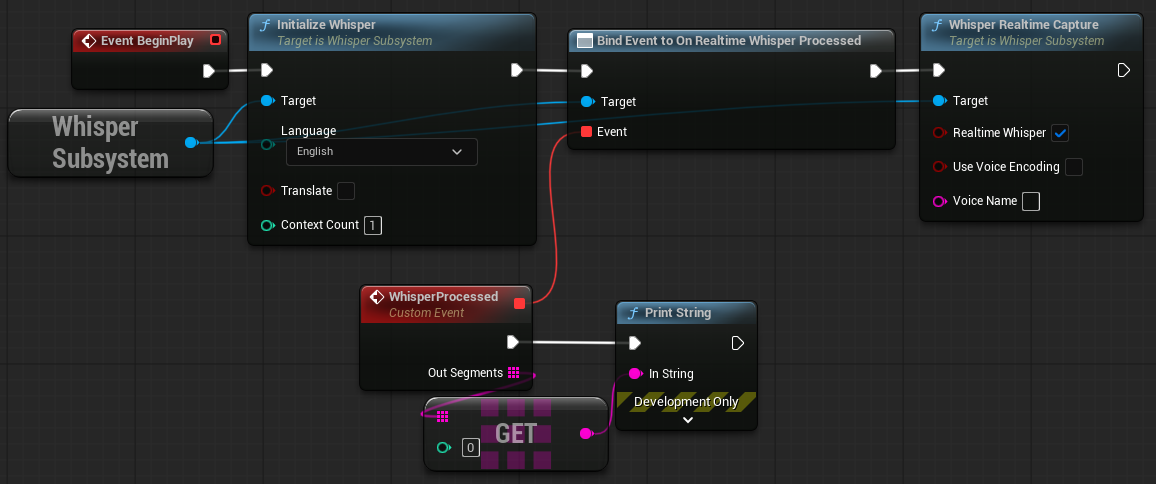
This system will use Voice Activity Detection by default to detect when there is a speaker. Other processing layers including noise suppression and endpoint detection can be enabled. View the settings documentation for more information.
An interrupt system is also available. By setting the Interruptable variable to true on the WhisperSubsystem, the realtime capture will then switch to detecting if the user speaking matches the InterruptVoiceName (can also be set on the Subsystem) and the OnInterruptDetected event will fire if detected. This can be useful to detect if the user is speaking while another character is speaking in order to interrupt their dialogue.