 Databiomes
Blueprints
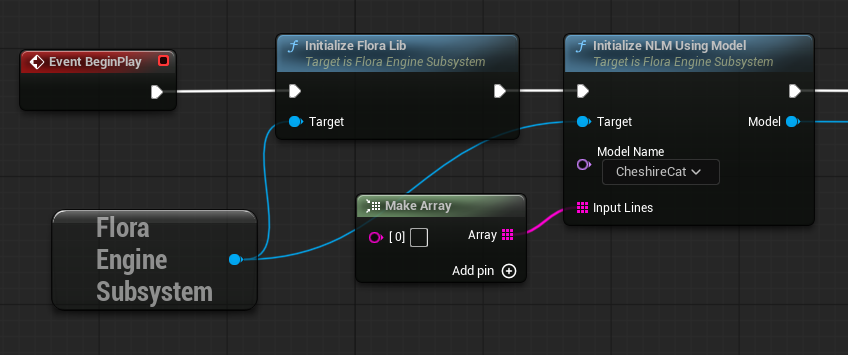
The node Initialize Flora Lib must be called before using the other nodes of the plugin. Create a new actor or navigate to the level blueprint, get the Flora Engine Subsystem and connect the initialize node to BeginPlay. Next, each instance of models to be used must be initialized using the Initialize NLM Using Model node. With this node, there will be a dropdown called Model Name that, if model files are properly located, will show a list of your available models. If the models are not appearing, try recompiling the blueprint to update the node (additionally if there are any changes to the models folder, the blueprint will need to be recompiled). The model can be provided with a list of input lines for inference (leave blank for CSV format models).
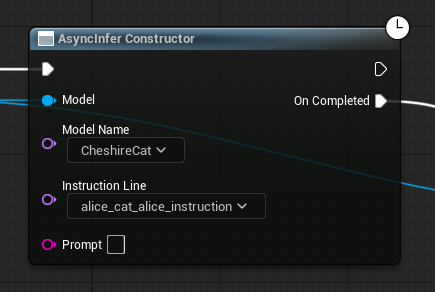
In order to infer the model you can use the node AsyncInfer Constructor. This node takes in the model as a parameter along with the name of the model given when the NLM was initialized. Setting the Model Name and compiling will update the Instruction Line dropdown and populate it with the available instructions according to the template file. A Prompt field is available to provide prompting text for the model.
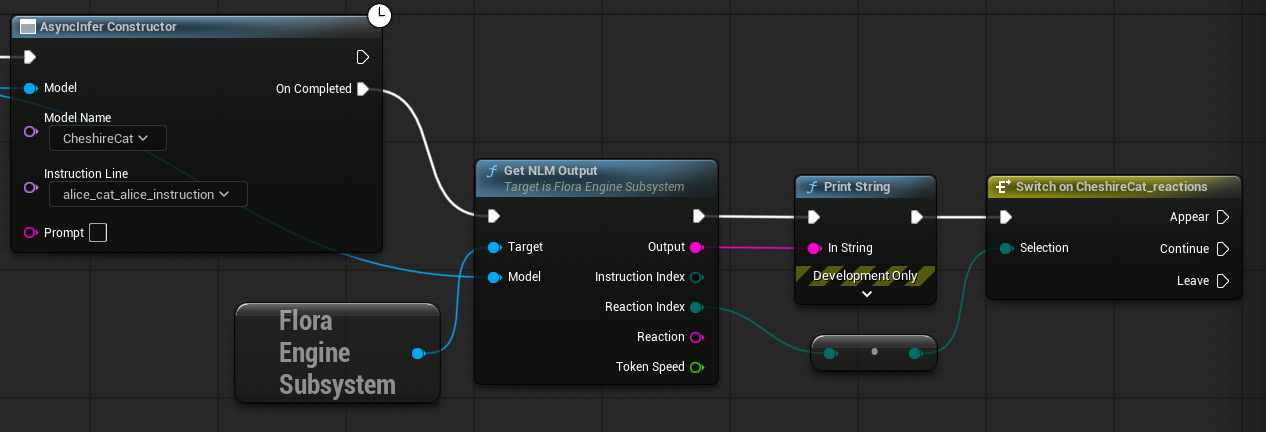
The output must then be retrieved from the NLM using the Get NLM Output node (note: this node must be used on the model after the AsyncInfer Constructor node has completed). This node will output the generated text as Output, the Reaction Index which can be used along side the generated reaction enums in the settings to create a state machine, the Reaction value itself and the Token Speed.
Additional Features
- State Machines - How to set up state machines quickly from the CSV format or using full MTP format.