 Databiomes
Additional Features
Ctrlvox has several other settings that can be adjusted through blueprint nodes that may help to provide more accurate transcription and categorization.
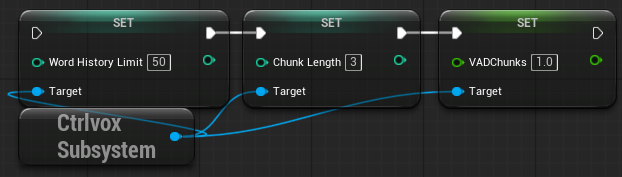
Word History
The Word History Limit can be set on the subsystem (default: 50). Ctrlvox will save a list of words and upon reaching the history limit, moderation categorization will be called on the list. This can be useful to provide more accurate categorization if more context is required. If set to 0, no history will be recorded.
Chunk Length
This is the length of audio chunks to process in seconds. Shorter chunks will be processed more frequently, but may have less accurate categorization, while longer chunks will be processed less frequently, but may have more accurate categorization. Default is 3 seconds.
VAD Chunks
The number of chunks of audio to check for voice inactivity. Can be set lower for shorter delay, but may cut off speech early.
Custom Categorization
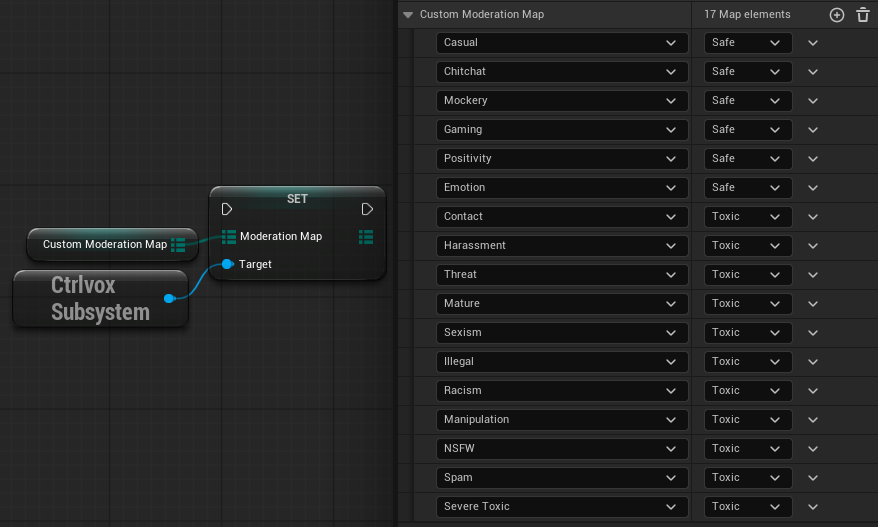
The moderation safety level can be assigned to each of the moderation outputs for a customized system. For example, 'Contact', which is a category for when contact information is being asked for, would be categorized as toxic for the case of game targetting a younger audience, where as in a mature game, it could be set to safe.
The default values for each are in the image below.
CSV Output
Output CSV must be toggled on in the Ctrlvox project settings tab to generate CSV data for use in retraining the model. When enabled, a file ctrlvox_data.csv will be generated in the saved folder of the project and will be appended to if it already exists.
This file will store the inputs from the players along side the categorization from Ctrlvox. This file can either be used directly, or edited to suit the particular game, and used on https://app.databiomes.com to train an improved moderation model.